The web app is deployed on several regions.
A user is accessing the app that was deployed on the US Server when he/she opens the app using URL https://example.com/.
That user is accessing the app that was deployed on the UK server when he/she opens the app using URL https://example.co.uk/.
Each deployment has its own PostgreSQL database. If the user only created an account on the UK Server,
other servers, such as the US Server will not aware of the existence of that user.
Likewise, if the account only created on the UK Server, the US Server will know nothing about that account.
The situation won't confuse the web app user. The user itself chose the URL domain he/she accessed, and the URL is displayed on the web browser's address bar.
The situation is different if the backend is going to be accessed by the Android App. The Android App has no address bar, so there's no URL that can be checked by the user.
Choosing a Regional Server for the Android App
When we are going to load data that are not related to any user, we can safely load it from the US Server.
However, before we can load any data related to the user, the user needs to login first.
The Android App doesn't know which server contains the user's login data. The Android has the capability to try login all the regional servers one by one.
User Data Protection Rule
However, the Android App can't just broadcast the login data to all regional servers. As a user, if I created my account on the US Server, I can only expect my next login, using any client app, will send my login data to the US Server again. If the client app also sends my login data to any other server, such as the UK Server, it is a breach of my privacy.
Sending the Hash of Email Address instead of the Email Address itself
The rule is to not broadcast plain email address and password to all servers.
Hashing the data before sending it to server will solve the privacy issue, as the server itself cannot extract the original data.
However, passwords are already stored as a hash on the database.
There is no way for the Android App to hash password and resulting the same hash of password that is stored in the database.
It is because the hash algorithm and the salt being used is not a public information.
broadcasting a plain password is not an option, so the only thing we can broadcast is the hash of email address.
As we can't broadcast neither password nor it hash, we cannot do try login operation.
We need to invent a new operation.
The account-exists Endpoint
We need to have the account-exists endpoint that can be used by client apps to check an account existence in a server.
It will return OK status if an account is found, or Not Found if otherwise.
However, that operation can't be made available to public. If we made it available to public,
it will allow username enumeration which can be used by hackers to brute-force login.
Using static access token
We can use static access token to secure the access to account-exists endpoint,
so only system that knows the static access token can access the account-exists endpoint.
This will eliminate username enumeration problem.
However, static access token is secure only when it is stored in the server.
If it is stored in an Android app whose binary code available on the user side, a hacker can extract the static access token.
Therefore, only server applications can safely use the account-exists endpoint.
We need another endpoint that is not vulnerable to username enumeration and doesn't need any access token,
so it can be freely accessed by the Android App.
From that free endpoint, the account-exists endpoint will be accessed.
The get-regional-server Endpoint
Instead of giving account-exists endpoint access to the Android App, we will give it access to
the get-regional-server endpoint.
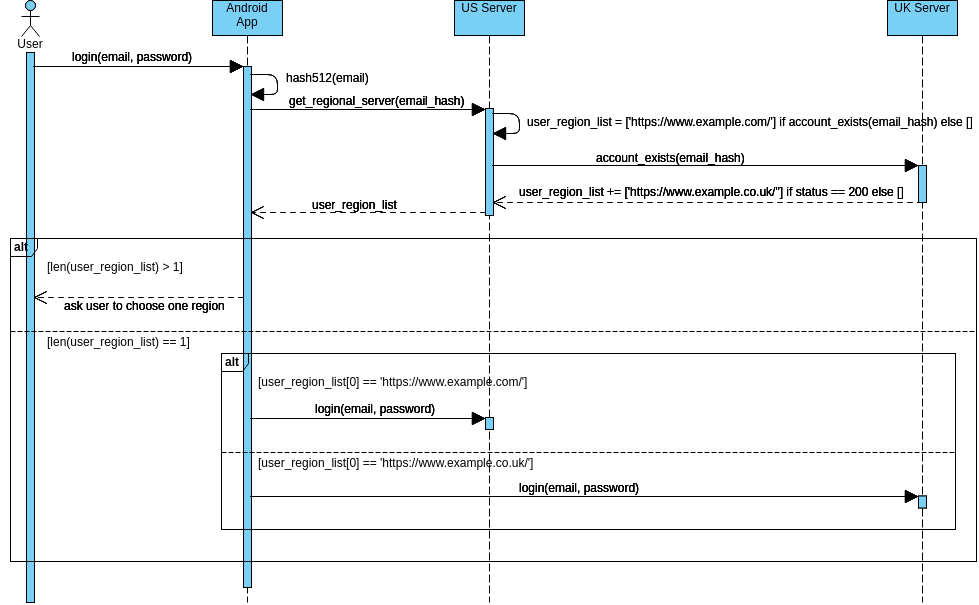
That endpoint will return an address of a regional server based on the given hashed user email.
Once the regional server address is retrieved, the Android App will try login to that regional server only.
The US Server is the fallback server. If none of the regional servers match the email hash, the US Server will be returned to the Android App.
The same email can be registered to multiple regional servers
As each regional server handles its own database, nothing can forbid the same person register the same email on multiple region servers.
Therefore, it is not enough for the get-regional-server to just return one regional server. It needs
to return a list of regional servers. It is up to the Android App to decide what to do if the list contains more
than one regional server.
The Android App can show a dropdown box to let the user to choose which regional server he/she wants to use.
The Sequence Diagram
We have covering the flow from the user entering username and password on the Android app up to the sending of that username and password to the correct regional server:
The Hash Generation and Checking
In the account-exists endpoint,
a regional server receives SHA-512 of user email address from the Android App.
the hash will be checked against the User table:
User.objects.extra(
    where=["encode(digest(email, 'sha512'), 'hex')=%s"], params=[email_hash]
).values_list('id', flat=True).exists()
Before we can successfully executed the checking above, we need to enable pgcrypto using psql as a PostgreSQL superuser:
create extension pgcrypto;