Introduction
There is a need to easily put multilanguage text on a source image. The system will output multiple images. One image for one language.
For example, if we have this image:

We can draw a text on top of it like this:
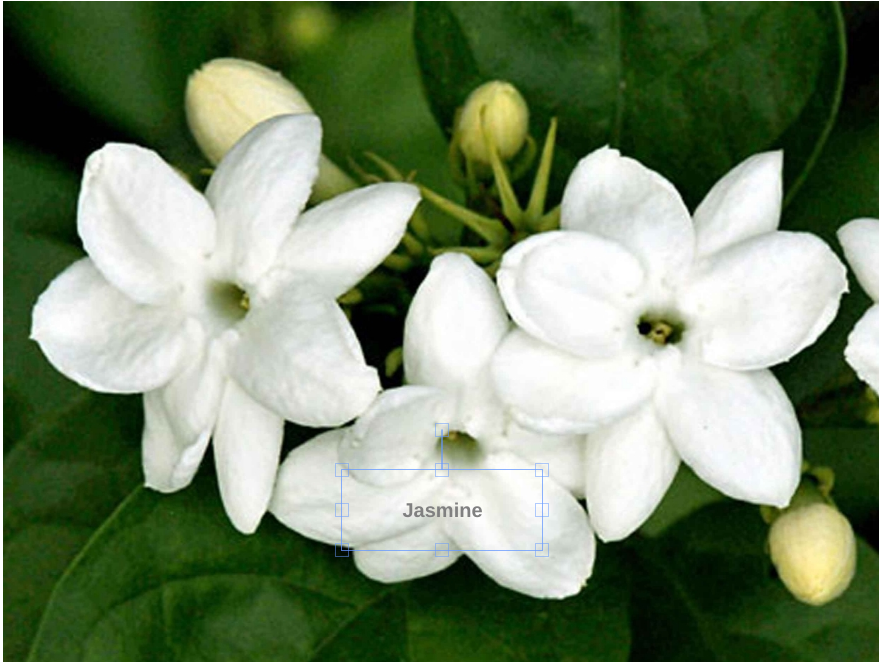
After that, we will automatically have images in Chinese, French, Japanese, Korean, Portuguese, etc:





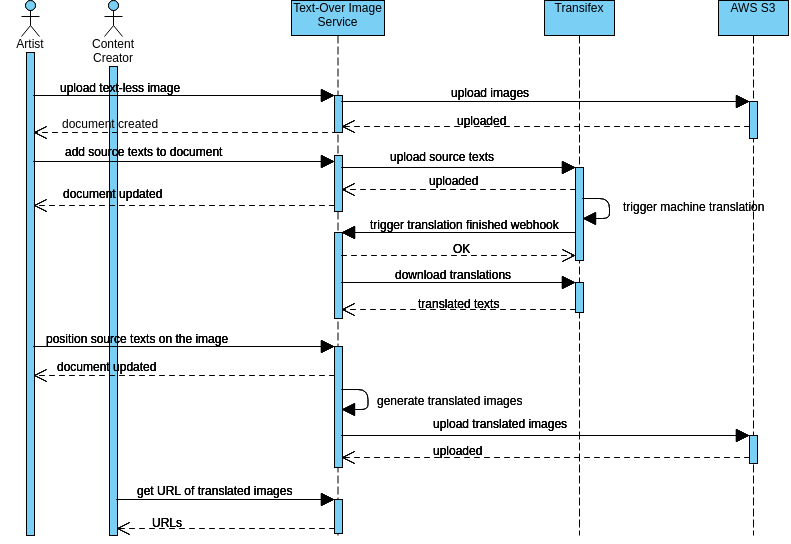
The source image that is containing no text is uploaded to AWS S3.
The text-display-definitions, such as position, color, font, size, etc are stored in a PostgreSQL database table.
The source text is uploaded to Transifex. On Transifex, a provided machine translator will translate the source text to multiple languages. Human editor can fix the translation later.
Once translation is finished, Transifex will notify our app via a webhook URL. A celery task will download the source image from S3, load text display definition from PostgreSQL, and load translations from Transifex, and combine those data to generate translate images. The translated images will then be uploaded to S3.
A client app is accessing the translated image using an S3 URL similar to the original image, but it has
a locale code added to it. For example, if the original image name is melati.png,
the Korean version name is melati.ko.png.
Image Translation Document
An image translation document is entities relationship marker. It marks the relating source image, source texts, and the display definitions of the source texts.
A user modifies image translation document via a form.
Defining Source Texts
Multiple texts can be put on an images. An input field is dynamically added when the user wants to add a new text.
Once the form is saved, the source texts are sent to Transifex to be translated.
Defining Text Display
We are using FabricJS, a great HTML5 canvas library, to develop UI that allows users to define text display. On this UI, a user can draw a rectangle to mark the position of the text. This UI also provides a form, so the user can choose a font family, font-weight, color, etc.
Once the user click save, the display definitions will be stored in the database.
Translated Images Generation
Once Transifex accesses our webhook endpoint, a celery task to generate translated images will be run.
The celery task downloads all the needed information from Transifex, PostgreSQL database, and S3. Those information is passed as parameters to a PhantomJS script that uses FabricJS to generate the translated images.
Once the translated images are generated, they will be uploaded back to S3.
The Sequence Diagram